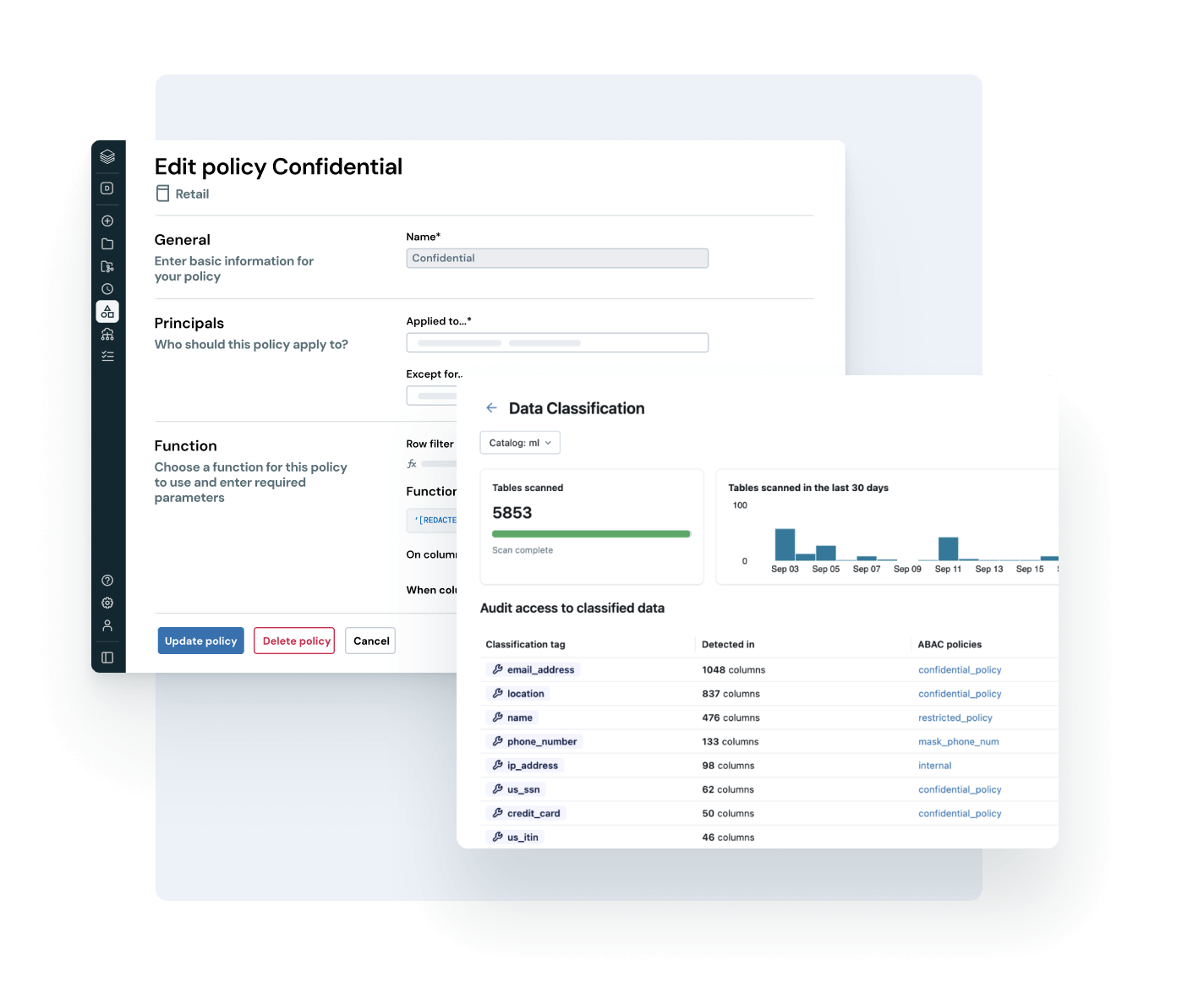
Managing data governance on a distributed platform, with hundreds of tables and multiple teams, has never been easy. Anyone working with Azure Databricks is familiar with the problem: tags are applied inconsistently, access policies multiply across each workspace, and ensuring GDPR compliance for sensitive data becomes a manual, error-prone task.
I’ve been testing the new Governed Tags and ABAC Policy features of Azure Databricks Unity Catalog over the past few weeks. My conclusion is clear: they bring enormous value to the platform and represent a significant leap forward in the maturity of Databricks governance.
Unity Catalog: The Emerging Standard for Unified Data Governance
Unity Catalog is not just a data catalog. It is Azure Databricks’ centralized governance layer, unifying access control, lineage tracking, auditing, and data quality across all workspaces connected to the same metastore.
The object model follows a three-tier hierarchy (catalog.schema.object). Every object (table, view, volume, ML model) is a securable object on which you can define permissions, apply tags, and track every access.
With the rapid advancement of its capabilities, Unity Catalog is becoming the de facto standard for governance on enterprise datalakehouse platforms. Governed Tags and ABAC Policies are the most concrete proof of this: these are not merely ancillary features, but the components that were missing to build robust, large-scale governance.
Governed Tags: The End of Chaotic Tagging
Tagging on Databricks has been around for a while, but until now it was completely unrestricted. Anyone could create any tag with any value, on any object. The result is what you see on almost all medium-to-large platforms: inconsistent tags, different names for the same concept (pii, PII, Pii_data, sensitive), making it impossible to use them reliably for automation or policies.
Governed Tags solve this problem at its root.
A Governed Tag is a tag defined at the account level, not the workspace level. It has a built-in Tag Policy that specifies the tag key (e.g., pii), the allowed values (e.g., ssn, address, email, maximum 50), who can assign it via the ASSIGN permission, and where it can be applied.
When a Governed Tag is applied to an object, it appears in the Databricks interface with a lock icon, visually distinguishing it from unrestricted tags. In practice, this is more useful than it seems: anyone browsing the catalog immediately understands which tags are under governance and which are not.
Once the table exists in the catalog, applying Governed Tags requires just a few ALTER TABLE commands. For this example, we’ll work with two distinct tags on two columns:
pii = ssnon columnssn→ enables the Column Mask Policydata_access = restrictedon columnbusiness_unit→ activates the Row Filter Policy
Keeping the two tags separate reflects different responsibilities: pii concerns privacy classification (GDPR, compliance), data_access governs commercial visibility by business unit.
Two separate teams, the “Data Protection Officer” and “Sales Operations,” can manage the ASSIGN permissions on each independently.
-- PII tag on ssn column: triggers Column Mask Policy
ALTER TABLE sc_demo.bronze.customer_profiles ALTER COLUMN ssn SET TAGS ('pii' = 'ssn');

-- Data access tag on business_unit column: triggers Row Filter Policy
ALTER TABLE sc_demo.bronze.customer_profiles ALTER COLUMN business_unit SET TAGS ('data_access' = 'restricted');
After running the commands, open the table in Catalog Explorer. Columns ssn and business_unit show a lock icon next to the tag name. This is the visual indicator confirming that the tag is under governance and cannot be assigned arbitrary values.
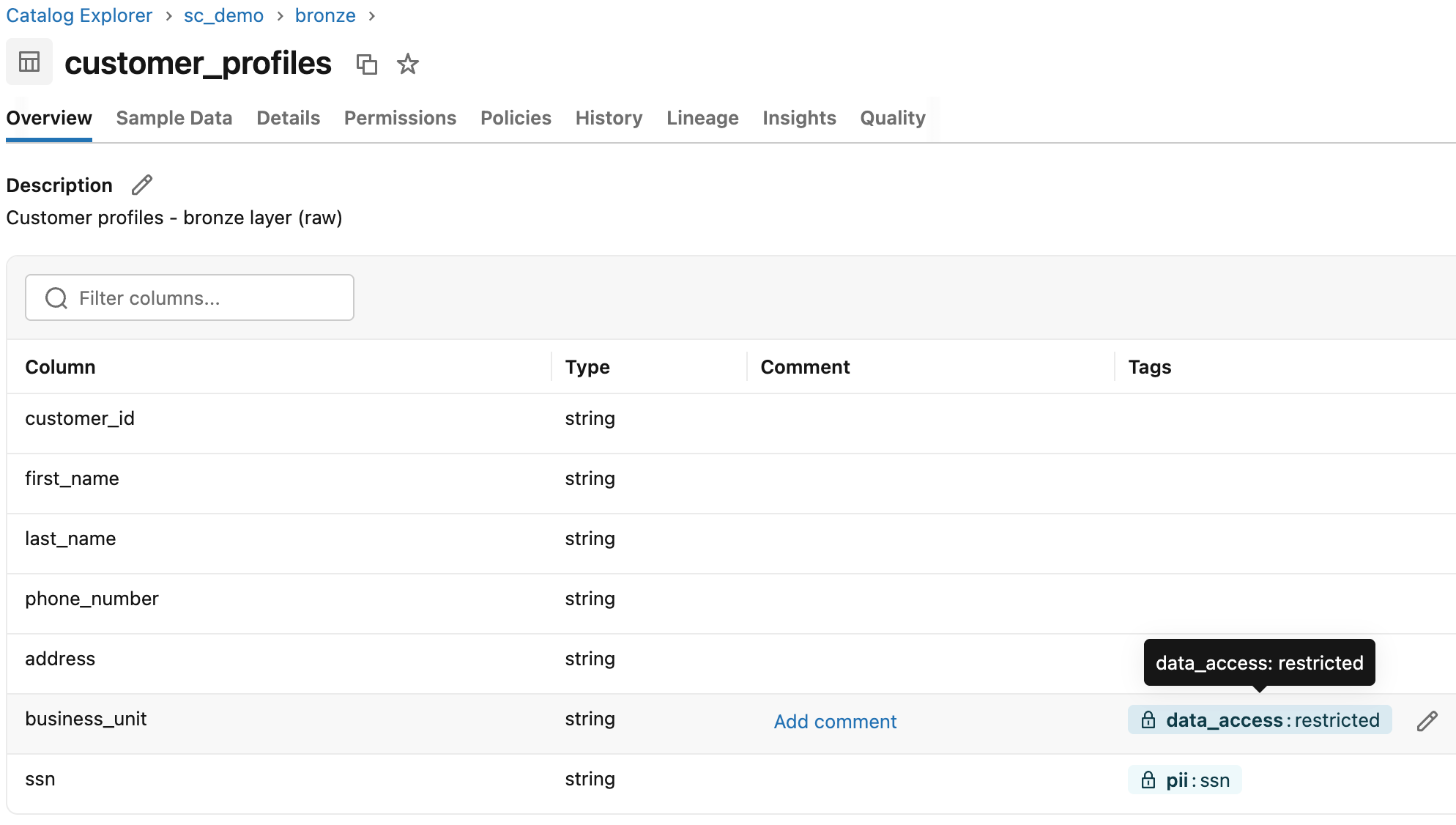
An interesting detail: if you create a Governed Tag with the same tag key as existing tags in your account, those assignments are automatically brought under governance. You can introduce governance incrementally, without having to manually reapply tags to the entire catalog.
Inheritance works as you would expect. If you apply a tag to a catalog or schema, all child objects automatically inherit it. The only exception is individual table columns, which do not inherit. You can tag a catalog with dominio=sales, and all tables within it will automatically inherit that classification.
Warning: Tag data is stored in plain text and can be replicated globally. Do not use sensitive or personal information in tag names or values.
Tag Policy: The Rules Governance Was Missing
The Tag Policy is the mechanism that distinguishes Governed Tags from simple naming conventions that everyone ignores after two weeks.
Every Governed Tag has an associated policy across three levels. Allowed Values ensure that only the values in the list can be assigned to that key: if you try to apply pii=cellphone and cellphone is not in the policy, the operation is blocked. ASSIGN permissions let you designate which users or groups can assign that tag: the data steward for the Finance domain manages cost_center=finance. Account-wide enforcement applies tags to all workspaces connected to the metastore, regardless of where the data engineer works.
This transforms tagging from an informal activity into a structured, auditable, and verifiable process.
System-Governed Tags
Databricks also introduces System-Governed Tags: platform-defined tags, identified by a wrench icon in the UI, that cannot be modified or deleted. They support standard scenarios such as data classification, lifecycle management, and asset certification.
Two of these are particularly useful in practice: tags to mark objects as certified (validated and reliable data) or deprecated (obsolete data that teams should no longer use). With System Tags, you can build a data lifecycle management workflow without having to reinvent the wheel.
ABAC: When Tags Become Dynamic Access Control
Governed Tags alone are already useful. But the real leap forward comes when you combine them with ABAC Policies (Attribute-Based Access Control).
Instead of defining explicit permissions on every single table for each user or group, define central policies that apply dynamically based on object tags. The tag becomes the attribute that drives access.
ABAC in Unity Catalog supports two types of policies.
Row Filter Policy
A Row Filter Policy automatically filters the rows returned by a query based on the user’s group membership. The classic use case in a multinational company is segmentation by business unit: the EMEA team sees only its own customers, the APAC team sees its own, and the global analytics team has full visibility. No team-specific views, no logic in reports—the policy applies to any query from any tool connected to the catalog.
The table has a column business_unit with values AMERICAS, APAC, EMEA—an explicit and stable business field. The UDF uses IS_ACCOUNT_GROUP_MEMBER(), the function recommended by Databricks to verify membership in account-level groups, which is also compatible with Microsoft Entra ID groups synchronized via SCIM:
-- Row visibility by business unit group membership
CREATE OR REPLACE FUNCTION sc_demo.security.row_access_by_bu(business_unit STRING)
RETURNS BOOLEAN
RETURN (
  IS_ACCOUNT_GROUP_MEMBER('global_analysts')
  OR IS_ACCOUNT_GROUP_MEMBER('account_admins')
  OR (IS_ACCOUNT_GROUP_MEMBER('bu_emea')     AND business_unit = 'EMEA')
  OR (IS_ACCOUNT_GROUP_MEMBER('bu_apac')     AND business_unit = 'APAC')
  OR (IS_ACCOUNT_GROUP_MEMBER('bu_americas') AND business_unit = 'AMERICAS')
);
Each condition combines the group check with the column value: a user in bu_emea sees only the rows in EMEA, not the others. No user without a group sees any rows (the default is deny).
With the UDF ready, create the policy via SQL or from the UI (Catalog Explorer, Policies tab on the catalog, then New policy):
CREATE POLICY bu_row_access
ON CATALOG sc_demo
COMMENT 'Row-level security by business unit: each group sees only its own segment, global_analysts and admins see all'
ROW FILTER sc_demo.security.row_access_by_bu
TO `account users`
FOR TABLES
MATCH COLUMNS has_tag_value('data_access', 'restricted') AS bu_col
USING COLUMNS (bu_col);
MATCH COLUMNS automatically identifies every column in the catalog tables sc_demo with the tag data_access = restricted and passes it as an argument to the UDF. Add a new table with a tagged business_unit column, and the policy applies without touching anything table-specific.
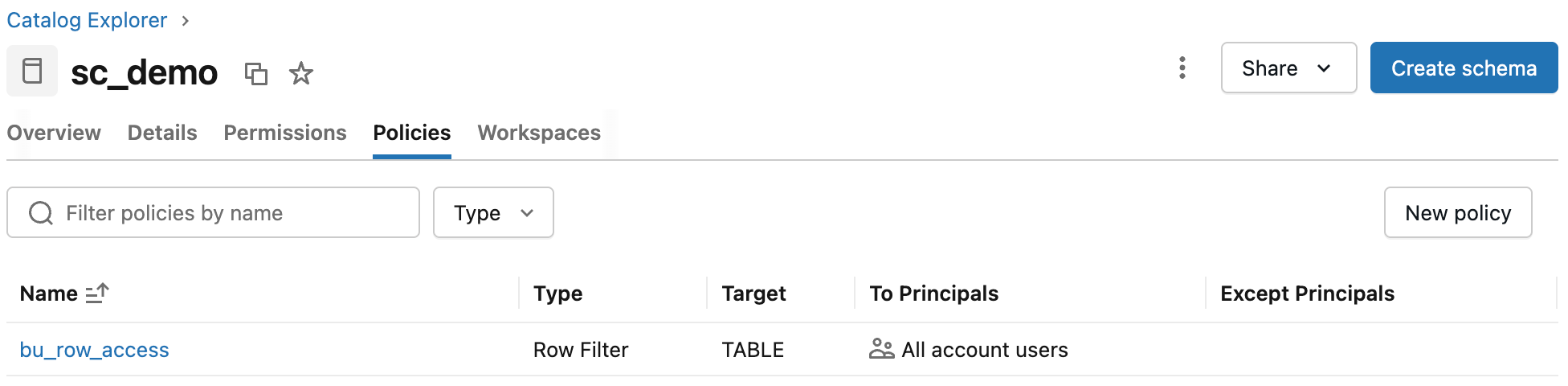
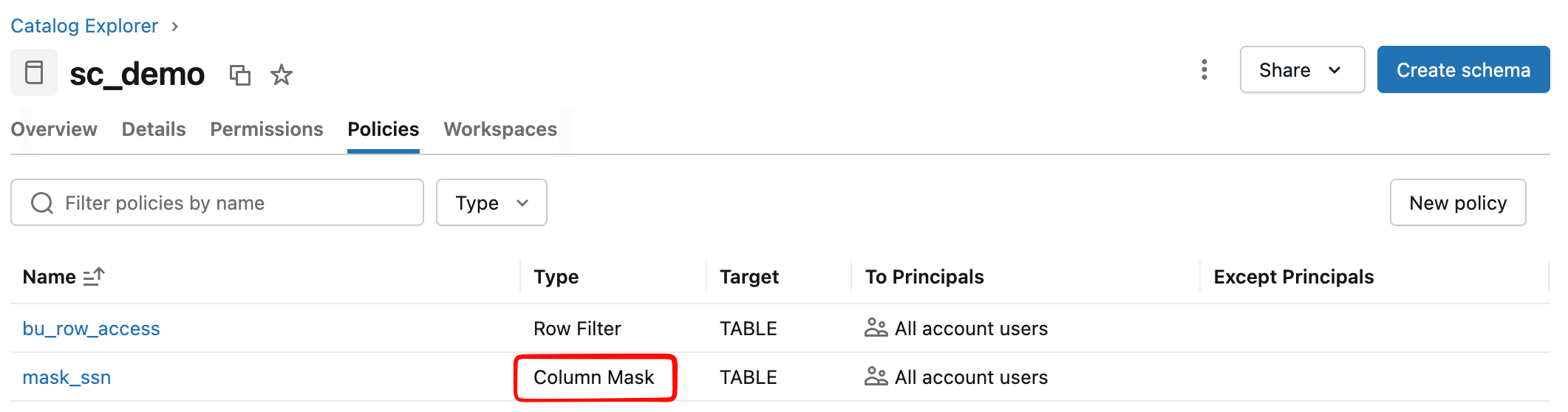
The policy appears in the Policies tab of the catalog with its scope, associated UDF, and involved principals.
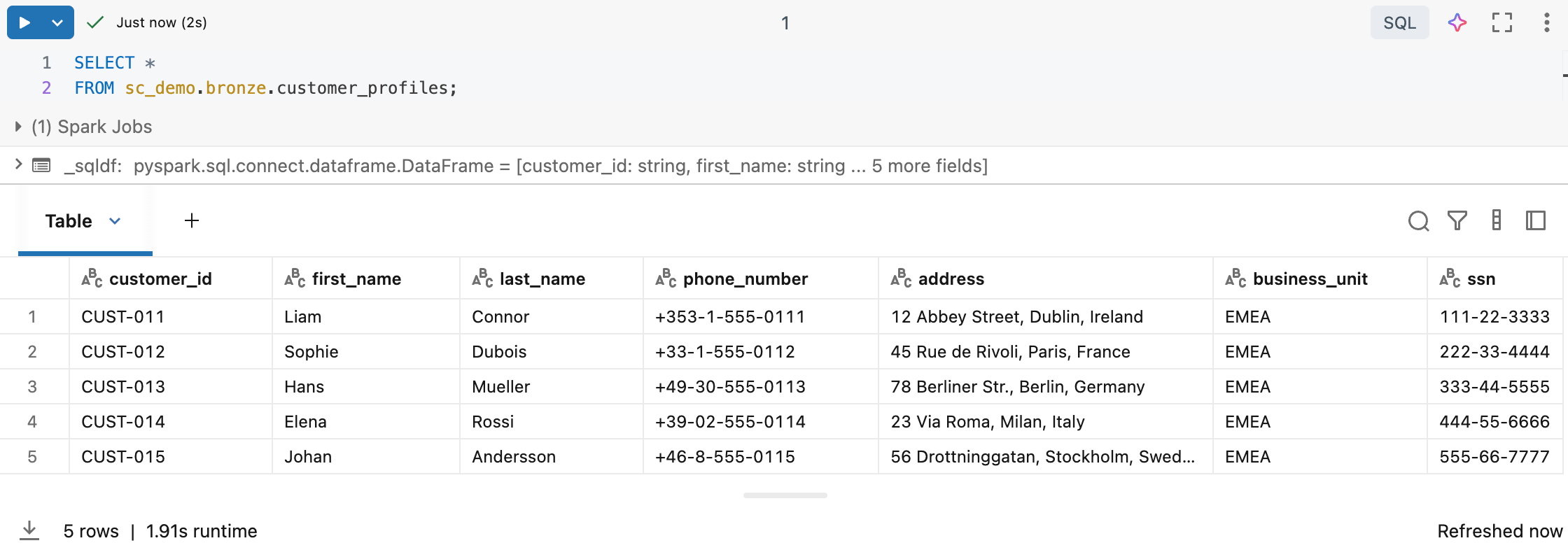
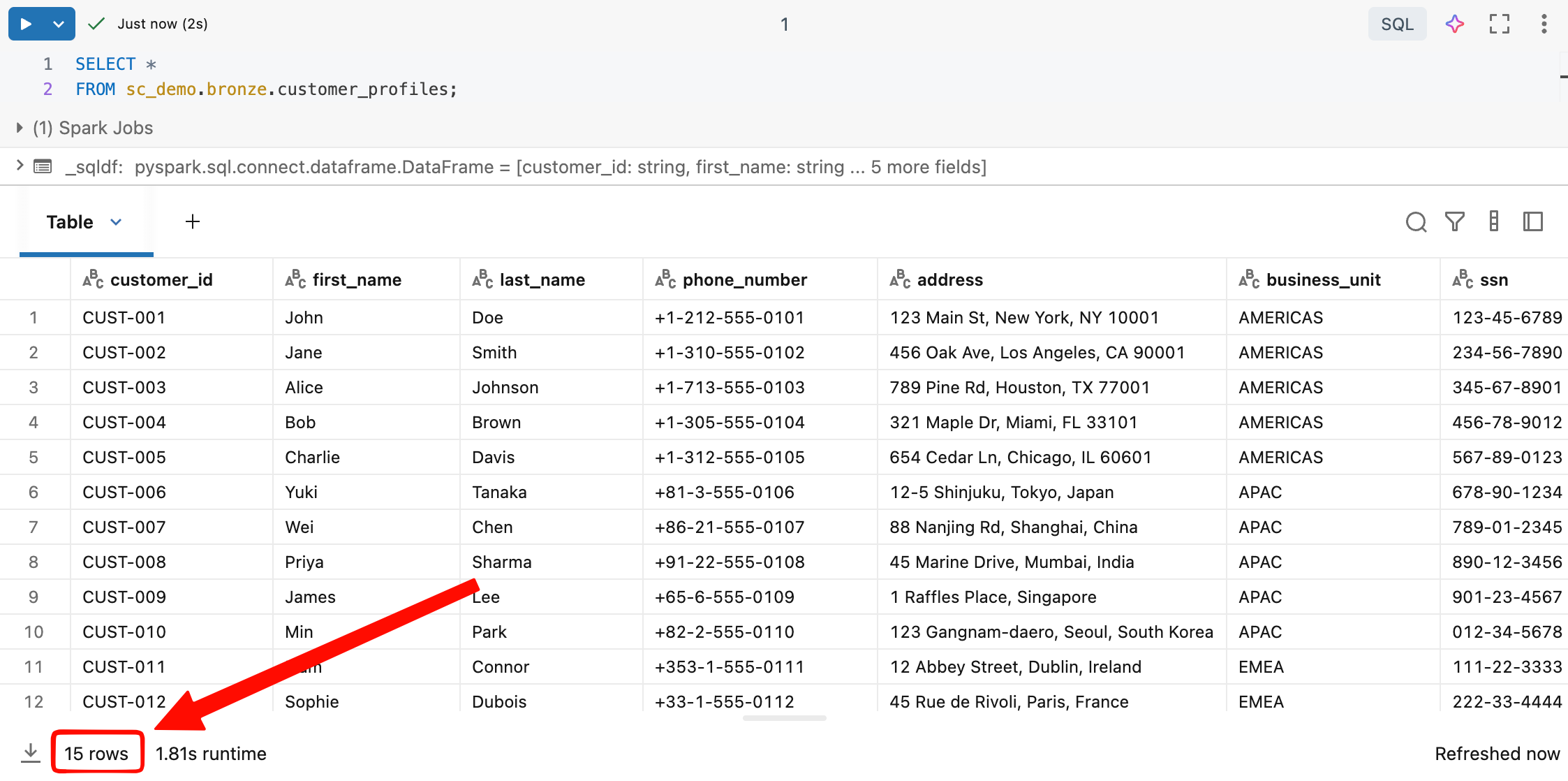
The same query returns different results depending on the user’s group:
| User | Group | Visible rows |
|---|---|---|
| user1@company.com | account_admins | 15 rows (all BUs) |
| user2@company.com | global_analysts | 15 rows (all BUs) |
| user3@company.com | bu_americas | 5 rows (AMERICAS only) |
| user4@company.com | bu_apac | 5 rows (APAC only) |
| user5@company.com | bu_emea | 5 rows (EMEA only) |
| user6@company.com | (no group) | 0 rows |
-- bu_emea analyst runs this query...
SELECT *
FROM sc_demo.bronze.customer_profiles;
Column Mask Policy
A Column Mask Policy replaces the value of a column with a value calculated by the UDF. The UDF receives the original value and decides what to return: the actual value for those with the privilege to see it, a mask for everyone else.
The UDF in sc_demo.security uses IS_ACCOUNT_GROUP_MEMBER() to decide:
-- Returns the real SSN for pii_readers and account_admins, masked value for everyone else
CREATE OR REPLACE FUNCTION sc_demo.security.mask_ssn(ssn STRING)
RETURNS STRING
RETURN (
  CASE
    WHEN IS_ACCOUNT_GROUP_MEMBER('pii_readers')
      OR IS_ACCOUNT_GROUP_MEMBER('account_admins')
    THEN ssn
    ELSE '***-**-****'
  END
);
The pii_readers group is dedicated to users who need access to actual PII data, typically the compliance team, the Data Protection Officer, or audit systems. It is not enough to be global_analysts or to have access to all rows: visibility of the SSN requires a separate explicit grant.
The policy links the UDF to all columns in the catalog that carry the pii=ssn tag:
CREATE POLICY mask_ssn
ON CATALOG sc_demo
COMMENT 'Masks social security numbers: pii_readers and account_admins see real value, others see placeholder'
COLUMN MASK sc_demo.security.mask_ssn
TO `account users`
FOR TABLES
MATCH COLUMNS has_tag_value('pii', 'ssn') AS ssn_col
ON COLUMN ssn_col;
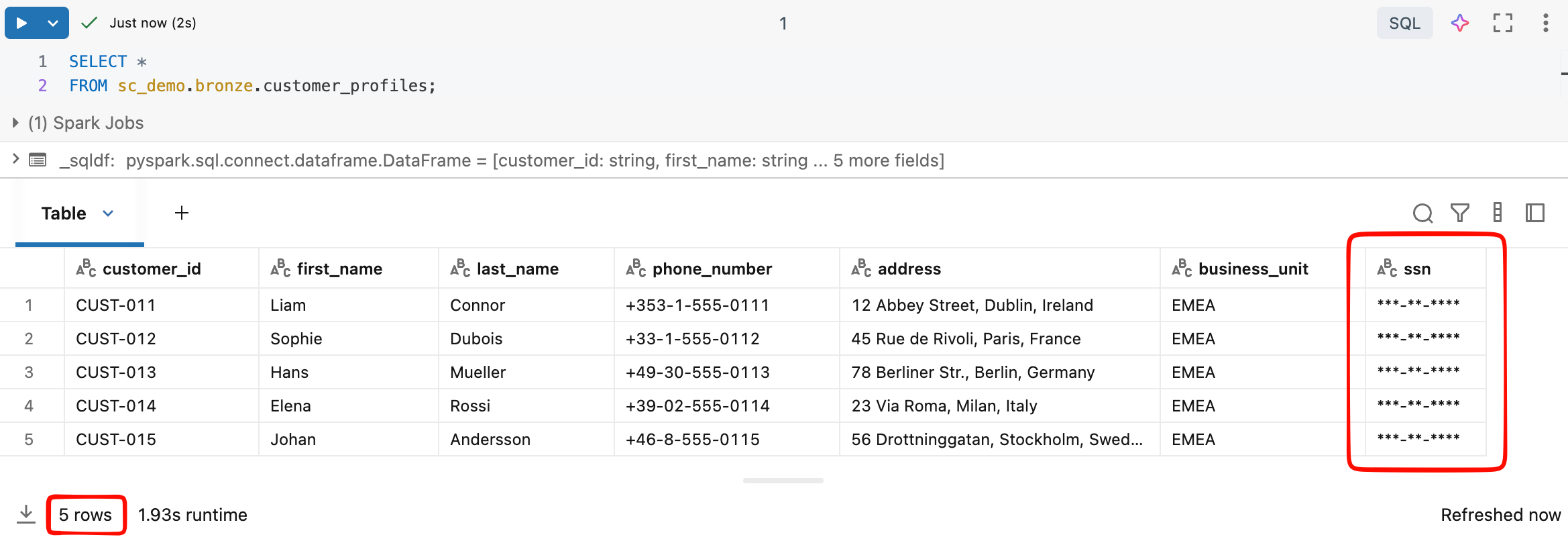
ON COLUMN ssn_col specifies that the mask applies to the tagged column, not the entire row. The result for the same query varies based on the user’s groups:
With both policies active, visibility depends on two independent dimensions—visible rows depend on the BU, and the SSN value depends on the PII group:
| User | Groups | Visible rows | SSN |
|---|---|---|---|
| user1@company.com | account_admins | 15 rows (all BUs) | actual value |
| user2@company.com | global_analysts + pii_readers | 15 rows (all BUs) | actual value |
| user3@company.com | global_analysts | 15 lines (all BUs) | ***-**-**** |
| user4@company.com | bu_emea + pii_readers | 5 lines (AMERICAS) | actual value |
| user5@company.com | bu_emea | 5 lines (AMERICAS) | ***-**-**** |
SELECT *
FROM sc_demo.bronze.customer_profiles;
The Policy Inheritance Model
One of the things I appreciated most while testing ABAC is hierarchical inheritance. Define a policy at the catalog level, and it applies to all schemas and tables within it that meet the conditions, including tables created in the future.
On a platform with multiple workspaces and hundreds of tables per domain, this makes a real difference.
- Before: Dedicated views for each team or application of functions for each table, updated manually every time a table is added or a requirement changes.
- Now: define the policy once, apply the tag to the sensitive column, and the system takes care of the rest.
Databricks recommends defining policies at the highest possible level, usually the catalog, to maximize coverage and reduce administrative overhead.
Technical Prerequisites
To use these features, you must ensure the following:
- An Azure Databricks workspace enabled for Unity Catalog
- Admin or workspace admin account to create Governed Tags
MANAGEpermission on the object or ownership to create policies- Databricks Runtime 16.4 or higher (or Serverless Compute) for ABAC Policies (older runtimes cannot access tables protected by ABAC)
CREATEpermission on governed tags at the account level
Current status: what works today
It is important to be honest about the status of these features:
| Feature | Status (March 2026) |
|---|---|
| Governed Tags | Public Preview |
| Tag Policy (allowed values, assign permissions) | Public Preview |
| System Governed Tags | Public Preview |
| ABAC Row Filter Policy | Public Preview |
| ABAC Column Mask Policy | Public Preview |
| Automatic Data Classification (PII detection) | Public Preview |
Everything is in Public Preview, so the APIs and interface may change. Databricks advises against using them in mission-critical workloads without an upgrade plan. However, the quality of the documentation and the stability I’ve observed lead me to believe that GA is relatively close.
Some practical limitations to keep in mind:
- Maximum of 1,000 Governed Tags per account and 50 allowed values per tag
- ABAC does not apply directly to views (but policies on the underlying tables are evaluated anyway, with the view owner’s permissions)
- Time travel and cloning on tables with ABAC must be excluded from the policy
information_schema.row_filtersshows only filters applied directly, not those derived from ABAC policies- Governed Tags do not apply to compute resources, SQL warehouses, and jobs, which use a separate mechanism
Why it’s worth trying them now
I’ve worked on data platforms where governance was managed via a shared Excel document: each team had its own tagging convention, permissions were handled on a case-by-case basis, and every new GDPR requirement resulted in a meeting to determine who should create the right views. Not an uplifting experience.
The model with Governed Tags and ABAC is conceptually different: governance becomes declarative. You declare the rule once, and the platform applies it everywhere, automatically and auditable. On the data engineering side, the manual work of creating and maintaining security layers for every new team or requirement disappears. On the compliance side, you have a single point where you can verify that sensitive data is classified and protected, with an audit trail included in Unity Catalog.
The direction Databricks is taking with Unity Catalog is the right one for a mature enterprise platform. These are the missing pieces.
Conclusions
If you’re building or evolving a data lakehouse platform on Azure Databricks, start experimenting with Governed Tags and ABAC Policy. The adoption curve is lower than it seems: the official tutorial is comprehensive, and the UI is reasonably intuitive. You’ll see value quickly, starting with the very first policies you configure.
They’re in Public Preview, so things will change. But the direction is clear, and the pace of the Databricks team’s development suggests that general availability isn’t far off.
Resources
- Governed tags — Azure Databricks | Microsoft Learn
- Tutorial: Configure ABAC — Azure Databricks | Microsoft Learn
- Unity Catalog ABAC overview — Azure Databricks | Microsoft Learn
Note on sample data: The data used in the code examples (names, addresses, phone numbers, tax IDs, and customer IDs) is synthetic data generated for demonstration purposes only. Any resemblance to real people is purely coincidental. It does not represent actual customer or company data.